
M618 Wireless Vertical Ergonomic Mouse with 3D5K Control and 115g Weight for Reduced Wrist Strain and USB Connectivity
White
£39.98
Sale price
£39.98
Regular price
Skip to product information

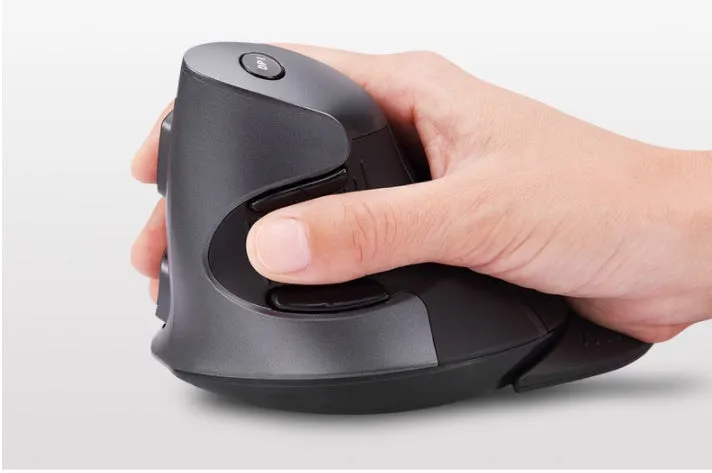
 The M618 wireless vertical mouse is engineered for comfort during long computing hours. Its defining 57° vertical angle reorients your hand from a flat, palm-down position to a more natural handshake grip. This posture helps reduce the twisting of the forearm (ulnar deviation) that contributes to repetitive strain discomfort. Weighing just 115g, it feels light in the hand, reducing fatigue during precise movements in applications like CAD software or spreadsheet navigation. Connectivity is simple via a plug-and-play USB 2.4GHz receiver, freeing your desk from wires. The surface features a silk-screened, oil-injected ABS finish that resists slippage. With dimensions of 135.5mm by 100.0mm, it provides ample support without dominating your workspace.
 This section details the specific materials, technical specifications, and construction elements that define the M618's performance and durability. We'll examine how its lightweight design, efficient electronics, and robust casing come together to create a reliable tool for daily office or creative work.
 Understanding how the M618 fits into different work environments helps illustrate its versatility. From the professional office to the home study, its design offers tangible benefits for users who spend significant time at a computer.
 Investing in an ergonomic mouse is an investment in comfort and productivity. This section breaks down the tangible value the M618 offers, from its day-to-day usability to its potential for reducing the need for future corrective equipment or interventions.


M618 Wireless Vertical Ergonomic Mouse with 3D5K Control and 115g Weight for Reduced Wrist Strain and USB Connectivity
£39.98
Sale price
£39.98
Regular price
M618 Wireless Vertical Mouse: Ergonomic Design with 57° Angle to Reduce Wrist Strain
Features and Build Quality of the Ergonomic Mouse
Ergonomic Design and Dimensions
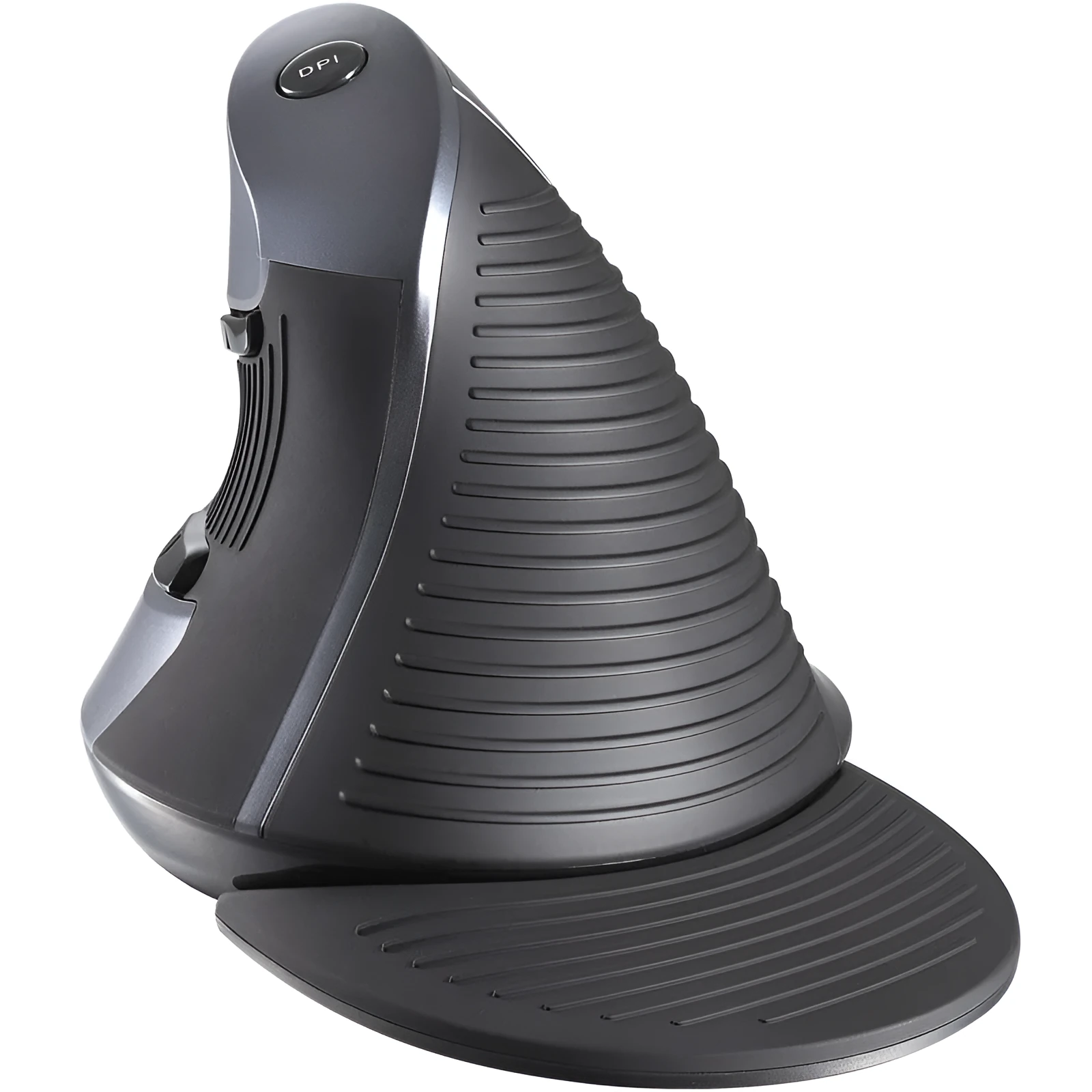
The core of the M618's design is its 57° vertical tilt. This angle is not arbitrary; it encourages the forearm bones (the radius and ulna) to sit in a neutral, parallel position, which can decrease pressure on the tendons and nerves in the carpal tunnel. The body measures 135.5mm in length, 100.0mm in width, and 87.0mm in height, creating a compact form that supports the palm and base of the thumb without requiring a large desk footprint. The contouring along the right side provides a ledge for your thumb, promoting a relaxed grip where fingers naturally fall onto the buttons.Technical Specifications and Performance
Powered by a standard battery, the mouse operates at 5V with a working current of 50mA, ensuring efficient energy use for extended wireless operation. Its standby current drops to just 16mA to prolong battery life during pauses in use. The sensor supports adjustable DPI, allowing users to fine-tune cursor sensitivity for tasks ranging from detailed photo editing to rapid webpage scrolling. The 3D5K configuration refers to three main buttons (left, right, middle/scroll wheel click), two side buttons for forward/back or custom commands, and a DPI switch button, offering a total of five programmable inputs plus the scroll wheel.Material Quality and Construction
The mouse body is moulded from ABS plastic, a material chosen for its good strength-to-weight ratio and resistance to minor impacts from desk-level drops. The oil injection finishing process gives the surface a consistent, slightly textured matte feel that improves grip compared to glossy plastics. The silk screen printing used for logos and indicators is durable against wear from skin contact. Buttons are designed for a crisp, tactile feedback with an estimated lifespan of millions of clicks, ensuring consistent performance over years of use.Practical Applications and Usage Scenarios
Professional and Office Use
For accountants, data analysts, or administrators facing eight-hour shifts, the vertical design can help mitigate the onset of discomfort associated with continuous mouse use. The programmable side buttons can be set to common shortcuts like 'Copy' (Ctrl+C) and 'Paste' (Ctrl+V), streamlining workflow in spreadsheet programmes. The stable 2.4GHz connection prevents lag or dropouts during video conferences or while working on large documents, a common frustration with some Bluetooth peripherals in busy wireless environments.Everyday Home and Creative Use
At home, the mouse's benefits extend to online shopping, social media browsing, and casual gaming. The lightweight 115g body and smooth, matte finish create a sensation of effortless gliding across a mouse pad, reducing the perceived effort of moving the cursor. The scroll wheel offers distinct, tactile bumps as you rotate it, providing precise control when reading long articles or navigating timelines in video editing software. This physical feedback, due to the engineered wheel mechanism, makes scrolling a more deliberate and comfortable action.Versatility and Portability
Despite its specialised shape, the M618 remains versatile. Its compact size makes it a practical companion for laptop users who work from cafes or co-working spaces. The USB nano receiver stores neatly in a dedicated compartment within the mouse body for travel. While primarily right-handed, its symmetrical button layout and general contour can be used by some left-handed individuals for basic tasks, though it is optimised for right-hand use. It functions on most surfaces, from wooden desks to fabric mouse mats.Key Benefits and Long-Term Value
Value Through Durability and Design
Compared to a standard £10-£15 mouse that may wear out or become uncomfortable within a year, the M618's robust ABS construction and rated micro-switches are built for longevity. By promoting a healthier wrist posture, it may help users avoid the costs associated with ergonomic assessments, wrist supports, or physiotherapy sessions often sought for repetitive strain issues. The efficient power management, with its 16mA standby draw, also means less frequent battery changes, saving on ongoing costs.User Satisfaction and Confidence
Users often report a period of adjustment when switching to a vertical mouse, typically a few days. After this, the confidence of using a tool designed for anatomical comfort becomes apparent. The peace of mind comes from knowing the 57° angle is actively working to keep the wrist in a neutral position, a direct result of the product's engineered form. This can lead to a more focused and less interrupted workflow, as physical discomfort becomes less of a distraction during demanding projects or tight deadlines.Reasons to Make the Switch
If you experience tingling, numbness, or fatigue in your hand, wrist, or forearm after computer use, your mouse posture could be a contributing factor. The M618 provides a specific, measurable intervention with its 57° tilt. Adding the programmable buttons tailors the device to your software, potentially saving hundreds of cursor movements per day. The combination of lightweight design, stable connection, and durable materials makes it a practical upgrade from a standard mouse, offering a clear path to more comfortable computing.